GRAFCET Symbols and Rules
Here you will learn everything about the standardized components according to IEC 60848, so you can plan your processes precisely and according to standards.

Initial Step
Symbol: A square with a double frame
The initial step marks the state in which the control system is immediately after starting the system (or after a reset). Each GRAFCET must have at least one initial step.
Example: Step 1 – "System in initial position / Waiting for start".

Step
Symbol: A simple square with a number
A step represents a stable state in the process. While a step is active, assigned actions can be executed. A step is only left when the following transition is fulfilled.
Example: Step 12 – "Workpiece is being transported".

Transition
Symbol: A short horizontal line on the connection line
The transition is the "gatekeeper logic". It contains the condition that must be met for the process to jump from the previous to the next step.
Example: E0.1 ∧ E0.2 (Light barrier interrupted AND start button pressed).

Continuous Action
Symbol: A rectangle to the right of the step with the identifier N
This action is active as long as the associated step is active. As soon as the step is left, the action ends immediately.
Example: Step 5 active → Motor M1 runs. When the process jumps to step 6, M1 stops.
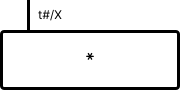
Time-Delayed Action
Symbol: A rectangle with a time value, e.g. 5s / X
The action is not started immediately when the step is activated, but only after the specified time has elapsed.
Example: 10s / X2 – Ten seconds after step 2 becomes active, the valve opens.
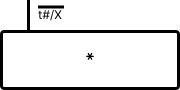
Time-Limited Action
Symbol: A rectangle with a limit, e.g. X / 3s
The action starts immediately with the step, but is automatically ended after the time has elapsed, even if the step remains active longer.
Example: X4 / 2s – In step 4, a warning signal is output for exactly 2 seconds.
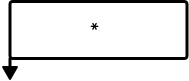
Stored Actions
Symbol: Rectangles with the identifiers S (Set) or R (Reset)
These actions change a state permanently. An S switches an output on, which remains on even after leaving the step. Only an R in a later step switches it off again.
Example: In step 10, the drill is started with S. In step 20, it is stopped with R.
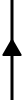
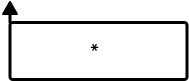
Loop
Symbol: A vertical line with an upward-pointing triangle arrow
In GRAFCET the standard flow direction is top to bottom. The upward arrow marks a feedback connection, i.e. a jump back to an earlier step.


Enclosing Step
Symbol: A square with diagonal lines at the corners
The enclosing step encapsulates a complete sub-GRAFCET. The diagonal corner lines indicate that this step contains its own sequence structure. It is connected like a normal step, but internally encapsulates a complex sub-process. The variant with a double frame is the enclosing initial step.
Example: Step 10 as an enclosing step contains the entire "Machine workpiece" sequence with its own sub-steps.

Macro Step
Symbol: A square with horizontal lines at the top and bottom edges
The macro step combines a sequence of steps and transitions into a single symbol. The horizontal lines at the top and bottom edges indicate that the step refers to a separate, detailed sub-GRAFCET (macro expansion). It is connected like a normal step.
Example: Macro step M1 represents the entire "Drilling process" which is described in detail in a separate GRAFCET.
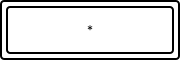
Forced Command
Symbol: A double rectangle (rectangle within a rectangle)
The forced command (Forçage) forces the setting or resetting of steps in another sub-GRAFCET. The double frame identifies this special action type. It is connected to a step like a normal action.
Example: F{GC2:INIT} – Forces the initialization of sub-GRAFCET GC2.

Comment Box
Symbol: A rectangle with a label gap at the top
The comment box is used for visual grouping and labeling of GRAFCET elements. The text in the top gap serves as a label or reference. The size of the box can be freely adjusted.
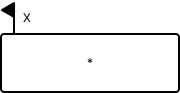
Event-Driven Stored Action
Symbol: A rectangle with identifier S and an event condition
This action is triggered by a specific event while the associated step is active. Unlike a normal stored action (which executes immediately when the step is activated), this action waits for a defined condition to occur.
Example: When step 5 is active and the event "Sensor B1 detected" occurs, output A1 is set and remains set.