GRAFCET Symbols and Rules
Here you will learn everything about the standardized GRAFCET symbols according to IEC 60848, so you can plan your processes precisely and according to standards.
This page was translated from German with the help of AI. In case of discrepancies, the German version prevails.

Initial Step
State of the control system immediately after start-up, shown with a double frame. Numbering is arbitrary, but “0” is common.

Step
Represents a state in the process. While a step is active, its associated actions are executed. Steps are numbered in ascending order.

Transition
The transition condition is placed to the right of the transition. An optional transition name goes on the left. The preceding step is only deactivated once the transition condition is fulfilled.
Transition Syntax
BG1Single condition (TRUE/FALSE)BG1 · BG2AND operation (entered as *)BG1 + BG2OR operationBG1Negation (entered as !BG1)(a + b) · cParentheses↑BG1Rising edge↓BG1Falling edge5s/X1On-delay (5 s after step 1)sensor/3sOff-delay (3 s after falling edge)X1Step query (is step 1 active?)[C1<5]Analog comparison in square brackets1Always true
Source Transition
Starts a GRAFCET without a preceding step.

Sink Transition
Deactivates the preceding step without a following step.

Continuous Action
The action is active as long as the associated step is active. As soon as the step is left, the action ends immediately.
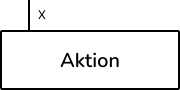
Continuous Action with Assignment Condition
The action is only active while the step is active and the additionally specified condition (SJ2) is fulfilled.
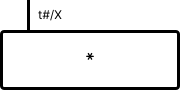
Delayed Action
The action only starts after the time specified to the left of the condition has elapsed and always ends with its step.
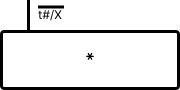
Time-Limited Action
The action starts immediately with the step and ends automatically after the specified time, even if the step remains active.

Stored Action on Activation
The variable is written when the step is activated and remains stored. The assignment uses “:=”.
Action Syntax
MotorVariable active while the step is activeK1 := 1Set variable to 1K1 := K1 + 1Increment counter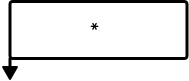
Stored Action on Deactivation
The variable is written when the step is deactivated and remains stored.
Stored Action on Event
The variable is written and stored as soon as the step is active and the event (here BG2) delivers a (here rising) edge.

Comments
Comments improve the readability of a GRAFCET. They must be enclosed in quotation marks.
Feedback
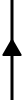
The default flow direction in GRAFCET is from top to bottom. An upward arrow marks the feedback to an earlier step.
Jump
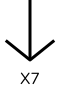
Jumps back to a previous step and is equivalent to a feedback connection. In this example, the jump leads to step 7.
Alternative Branch
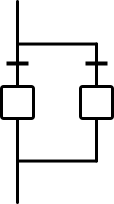
Splits the sequence into alternative paths. The transition conditions must be mutually exclusive. As a result, only one path is executed.
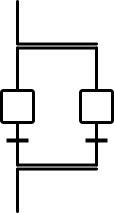
Parallel Branch
Splits the sequence into several partial sequences that run simultaneously. The sequence only continues once all partial sequences are completed.

Macro-Step
Combines a sequence of steps and transitions. This sequence must be processed completely. The sequence starts with an E and ends with an S. The macro-step is labeled with an M.

Enclosing Step
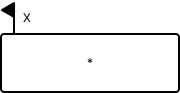
Encapsulates partial GRAFCETs. Activating the step activates its enclosures, deactivating it deactivates them. The step marked with an asterisk starts the partial GRAFCET.

Enclosure
Frame for the partial GRAFCETs of an enclosing step. The number (here 1) and name (here G1) are placed on the left of the frame. An initial step is also permitted here.

Forcing Order
Forces another GRAFCET immediately into a defined state and overrides its logic. In this example, step 4 in enclosure G1 is activated.
Forcing Orders
G1 {}Deactivate all steps in G1G1 {4}Activate only step 4 in G1G1 {*}Freeze the current step, no further switchingG1 {INIT}Initialize G1, the initial step becomes activeReady to Start?
Create your own GRAFCET for free now and apply what you've learned!